NoBarrier
Game translation ecosystem

Play beyond language.

Translate live, prepare supported games before launch, learn from the language you encounter, and extend the same NoBarrier workflow to console with Bridge.

NOBARRIER

Hattı koru. Tekrar üzerimize geliyor.

Hold the line. It is coming back around.
LIVE TRANSLATION · SCANNING
Desktop app

Not a generic screen translator. Built around games.

NoBarrier follows the way a game session actually works: prepare supported text before launch, translate live or across the full screen, and keep the setup that makes sense for each game.

02 · SMART HYBRID Try the translation modes

Start local. Refine only when the line needs it.

Smart Hybrid surfaces a fast local result first, then replaces it with a refined cloud translation when more context can improve the line — without interrupting the play session.

Fast local result appears first Cloud refinement arrives in the same overlay The player keeps reading instead of waiting
DESKTOP TRANSLATION
Ready
Incoming line

We should leave before they see us.

Local resultFAST
Gitmeliyiz, bizi görmeden önce.
Cloud refinementREFINED
Bizi görmeden önce buradan ayrılmalıyız.
Overlay updates in placeBizi görmeden önce buradan ayrılmalıyız.
Capture exactly what NoBarrier sees Place subtitles where you want them Reuse translation memory across sessions
Game-ready workflows

Before the line appears. Beyond the subtitle box. Tuned for the game.

Live translation is only one part of the workflow. NoBarrier can prepare supported game text in advance, translate text-heavy moments across the screen, and keep game-specific choices together.

01 · BEFORE YOU PLAY

Pre-Translate prepares the game before you press Play.

For supported games, NoBarrier can prepare game text ahead of time and build reusable translation memory before the session starts. When matching dialogue appears later, the translation workflow already has context to work with.

Prepare supported game text in advance Build reusable game memory Keep live play focused on the game
PRE-MEMORY TRANSLATE
E
Selected gameEchoes of MeridianC:\\Games\\EchoesOfMeridian
LanguagesEnglish → Turkish
Pre Mode Smart Hybrid
Words to save200 words
AI Guard Ready
Preparing game memoryScanning supported game text before launch
WORKING
02 · WHEN ONE REGION ISN'T ENOUGH

Translate the full screen when the moment calls for it.

Full-Screen Translation is for moments that are broader than the main subtitle OCR flow. When menus, terminals, objectives or scene text matter more than one subtitle box, NoBarrier can read the whole frame and return the parts you need.

Works beyond the main subtitle region Useful for menus, terminals and objective text Lets the regular live subtitle flow stay focused
NO BARRIER · FULL-SCREEN VIEW
MENU TEXTGüvenlik seviyesi yükseldi.
TERMINAL LINEErişim doğrulandı. Kapı açılıyor.
SCENE TEXTKuzey geçidine erişmek için terminali aç.
03 · BUILT PER GAME

Your translation setup can follow the game.

Capture choices, translation behavior and presentation do not need to be treated as one universal preset. NoBarrier is designed around game-specific setup and repeatable sessions.

Active game settings
Echoes of MeridianC\Games\EchoesOfMeridian
WildgateSteam Library\Wildgate
ViewfinderC\Games\Viewfinder
Custom OCR Area Saved Overlay Position Saved
Translation Saved
Source languageAuto Detect
Target languageTurkish
Translation mode Smart HybridLocal result first · AI improves in background
Translation overlay
Subtitle fontSegoe UI
Subtitle color White
Font size
32px
Background
62%
Default positionBottom
Show previous translationKeep context visible between lines.
04 · QUICK CONTROLS

The toolbar keeps the core actions close.

Select the OCR area, move the overlay, start OCR, and trigger full-screen translation from one compact control surface while NoBarrier stays ready.

NOBARRIER · ACTIVE GAME
Select AreaF2
Move OverlayF1
Start OCRF10
Full ScreenF9
READYV
ViewfinderCore controls stay close and ready.
Learning

Your game becomes the learning material.

NoBarrier turns language collected from your own gameplay into a personal learning loop. Game memory feeds Flashcards, sentence-based Quiz practice and Grammar Lab, while simple progress stats show how your learning is moving.

FlashcardsTurn words and short lines from your own gameplay into review cards you can practice later.
QuizChoose the correct translation for real sentences taken from the games you play.
Grammar LabStudy sentence patterns with AI guidance, mastery tracking and review prompts built from game examples.
StatisticsTrack card accuracy, quiz accuracy, grammar progress and learning XP at a glance.
Try the interactive learning demos
FlashcardQuick review from your own gameplay
Viewfinder

Saved words and short lines become cards you can review later.

QuizChoose the correct translation
Spider-Man
IN-GAME SENTENCE

“Steal your biscuit?”

Choose an answer.

Quiz uses real game sentences and asks you to pick the right translation.

Grammar LabStudy sentence patterns with AI guidance
Wildgate
PATTERN

We should have left before dawn.

should have + V3 describes a past action that would have been better to do.

Grammar Lab turns game examples into guided study and review steps.

Console + Bridge

NoBarrier, beyond PC.

Bridge brings console gameplay into the same NoBarrier workflow you already use on desktop — carry the video into the app, translate the dialogue, and keep the same familiar controls around it.

Console workflowThe same NoBarrier translation system, extended beyond PC.
BRIDGE · IN DEVELOPMENT
01 · YOUR CONSOLEPlay normally on console.

Keep the game on your TV while Bridge carries the gameplay feed into NoBarrier.

PlayStationXboxMore
GAMEPLAY
N
NOBARRIER BRIDGEIN DEVELOPMENT
CAPTURE FEED
03 · NOBARRIER DESKTOPTranslate through the same desktop workflow.

Use OCR, your translation mode and the same overlay tools already available on PC.

01Play on console

Your console and TV remain where you play. Your normal controller flow does not change.

02Bridge carries the gameplay feed

Bridge moves the console video into NoBarrier so the desktop app can read the scene.

03NoBarrier handles translation

Choose the translation mode, place the overlay and use the same desktop tools you already know.

NOBARRIER · ACTIVE GAME
Settings
Global controls · selected game profile
General
Full Screen Translation ModeChoose how full-screen translation is processed.
Smart Hybrid
Keep last subtitle on screenHide the overlay if no new subtitle appears.
10 sec
Stop OCR with ESCWorks globally while the game is focused.
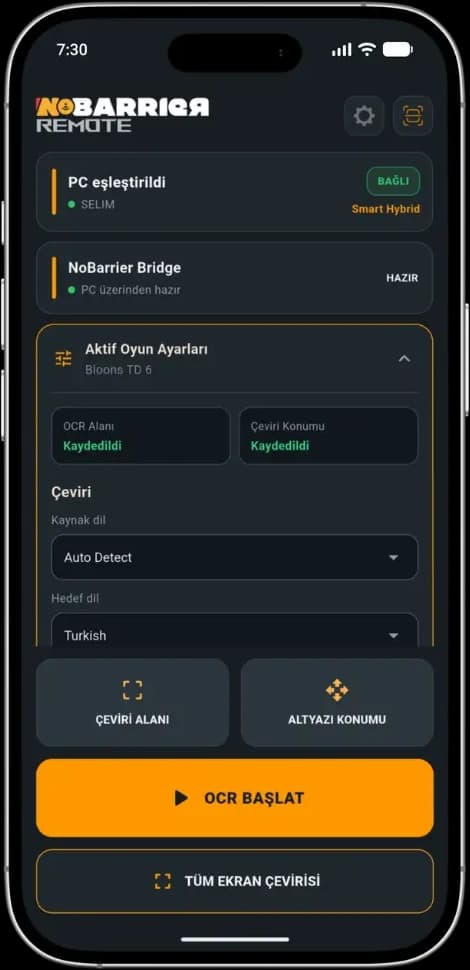
Mobile Remote
Pair your phone with NoBarrierUse QR pairing or a backup connection.
Ready
Show QR Code
Backup Connection
B
ACTIVE GAMEBloons TD 6
OCR AreaSaved
Overlay PositionSaved
Translation overlay
FontSegoe UI
PositionBottom
Opacity
62%
Game-specific settings are saved automatically.
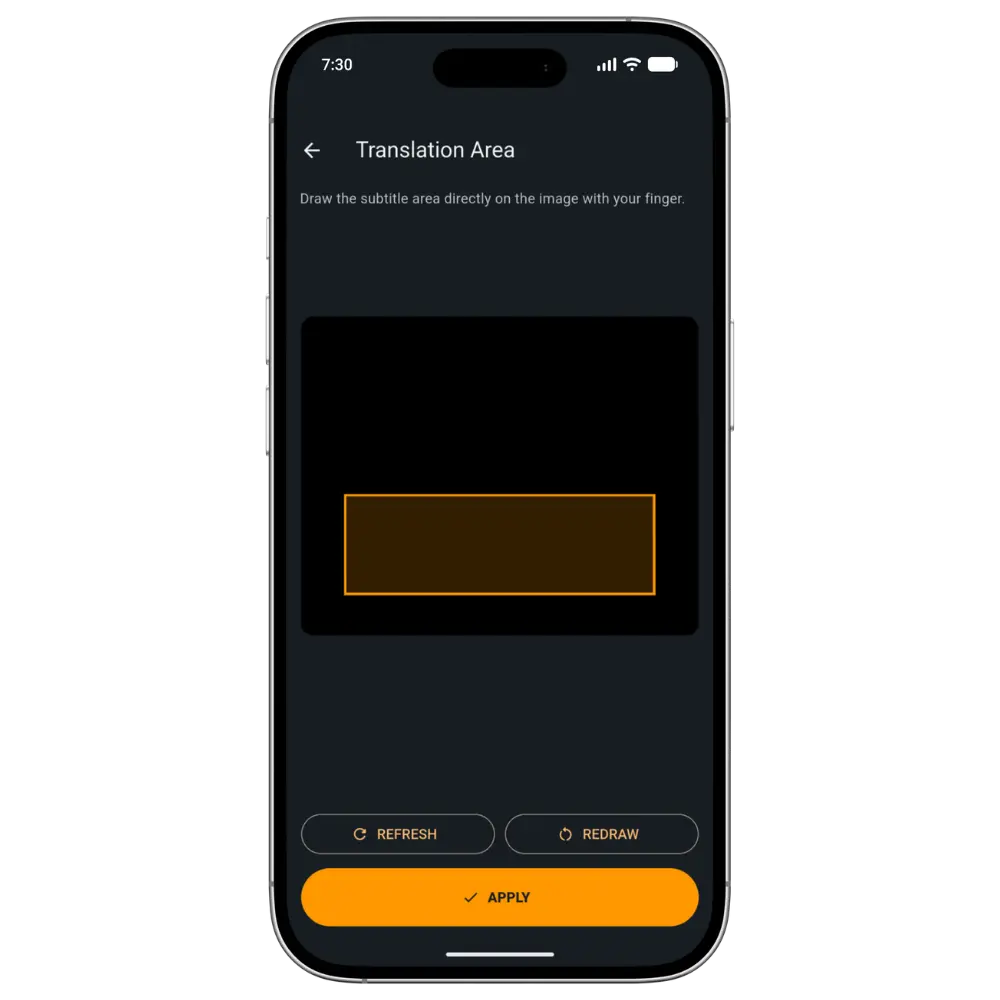
OCR area selection
Subtitle region
Draw the subtitle area from your phone and apply it instantly.
RefreshRedrawApply
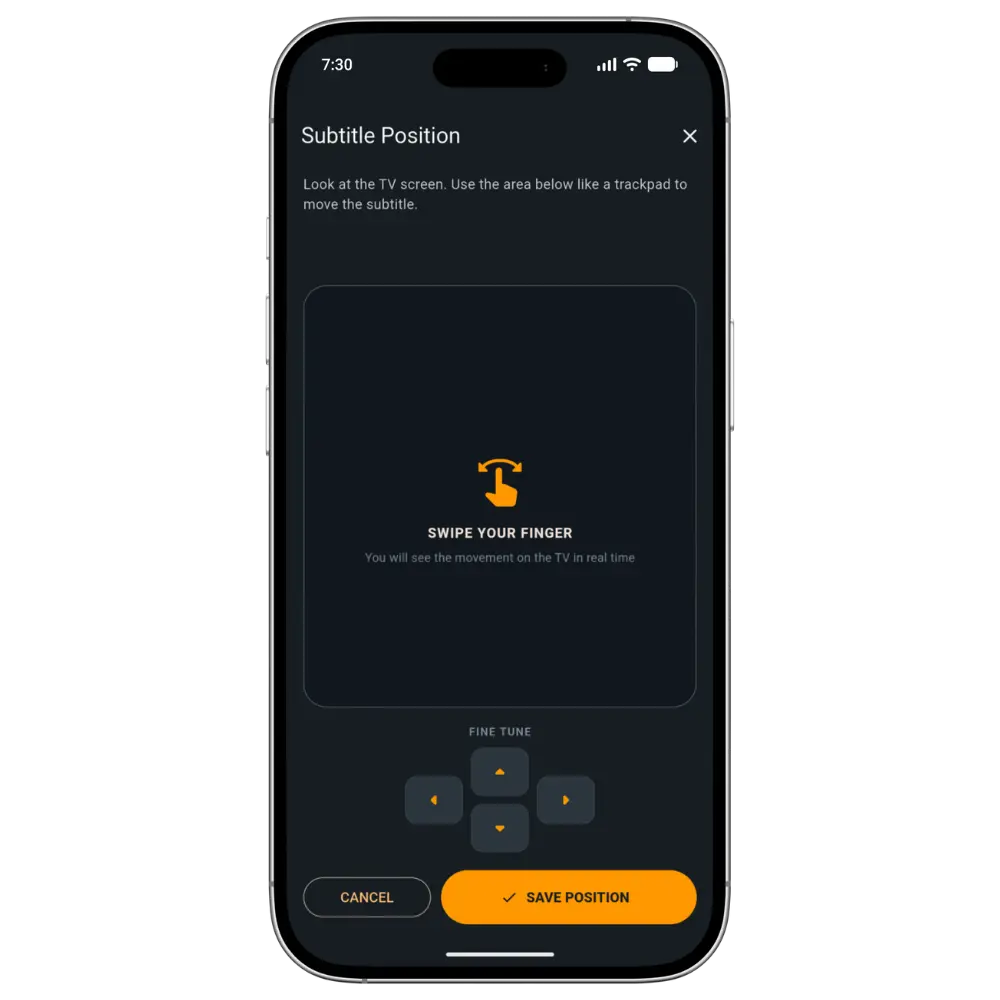
Subtitle positioning
Move the subtitle without leaving the couch.
Use the phone like a trackpad, then fine tune and save the new position.
←↑↓→
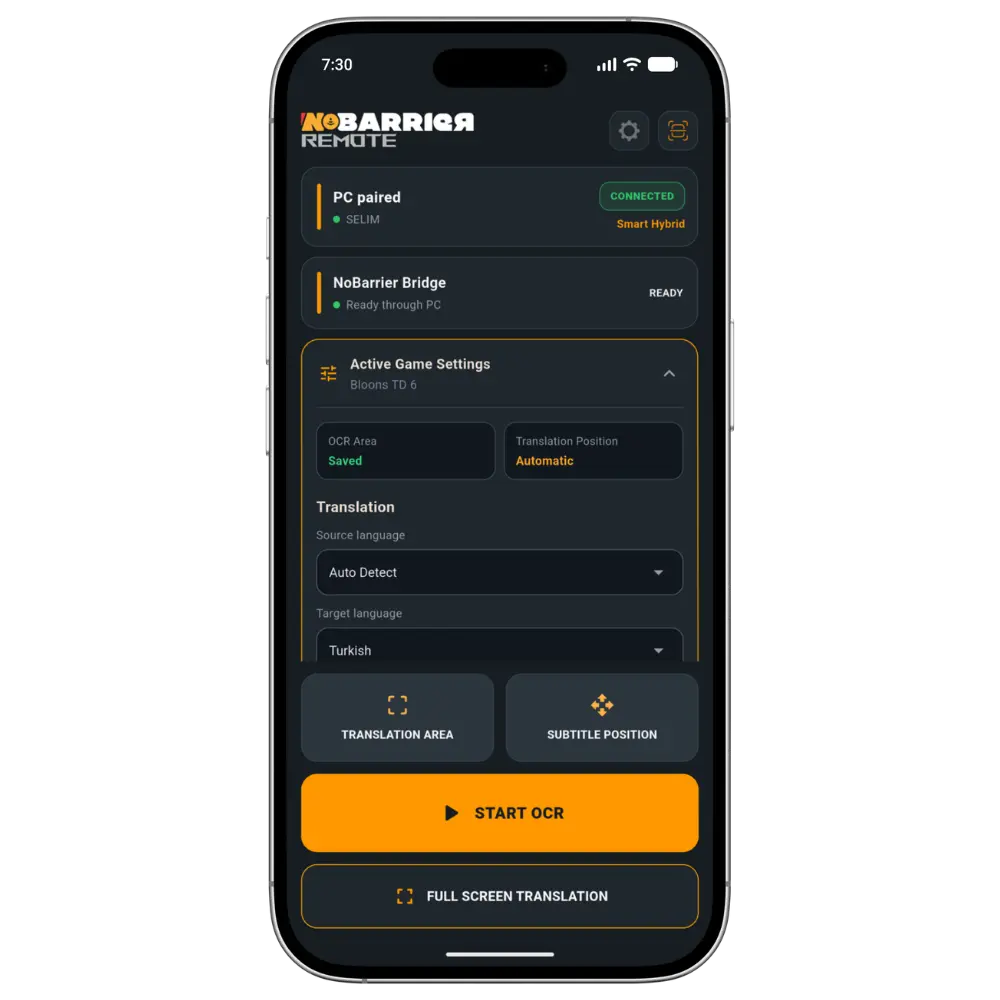
NoBarrier Mobile Remote main controls
NoBarrier Mobile Remote translation area selection
NoBarrier Mobile Remote subtitle positioning controls
Mobile Remote

Stay in the game. Control NoBarrier from your phone.

Pair once with a QR code, then use your phone as the practical second screen for NoBarrier — especially when you are playing from the couch or on a console setup.

  • Start and stop translation
  • See translated lines on your phone
  • Choose the capture area from a live preview
  • Move the subtitle overlay without leaving the couch
  • Start and stop translation
  • See translated lines on your phone
  • Choose the capture area from a live preview
  • Move the subtitle overlay without leaving the couch
One ecosystem

One clean workflow, expanded beyond the desktop.

NoBarrier starts on desktop, then extends outward. PC gameplay, Learning, Console + Bridge, and Mobile Remote stay connected inside one simple system.

NoBarrier for Windows

Your game. Your language.

Start with the desktop app today. Console support through NoBarrier Bridge is in development.